Accessible by Design: The Role of the 'lang' Attribute
by Todd Libby published on
When starting a project, whether it is an application, a mobile app or site, or just a website in general I still see an alarming number of examples where the language attribute is not included in the <html> element. Not the !DOCTYPE, but the element directly after the DOCTYPE.
I have audited many sites and many frameworks in the past, I have noticed an alarming omission right from the outset when developers are building sites or applications. Especially in the mobile space and let's face it, in web development we focus on making things for ourselves and if it works on our computer, it must work everywhere! Right?
I see it more prevalent these days. There are surveys out and the issue of accessibility education in university or boot camps still lacks. New developers entering the field who aren't aware, framework authors that just don't know, understand, or they just don'make their work accessible.
I am here to discuss the importance of the language attribute in your code.
The Attribute and the Importance of the Language Used
Sometimes, a tiny detail can make or break the experience for millions of users. One of these tiny, powerful details is the lang attribute in your HTML.
The lang attribute is a simple piece of code that tells web browsers and screen readers what human language your page is written in. For example:
<html lang="en"> means the page is in English.<html lang="es"> means the page is in Spanish.
When you forget this attribute, you're not just missing a semantic tag—you're creating a major accessibility barrier. If you don't tell the computer what language you're using, assistive tools won't know how to read your content correctly.
There Is Data Here and You Should Read It
The WebAIM Million Report is an accessibility report done by WebAIM every year and it's an accessibility evaluation of the top one million homepages on the internet. 2025 marked the seventh year this has been done and the results are not surprising.
Let's show the data for the language attribute.
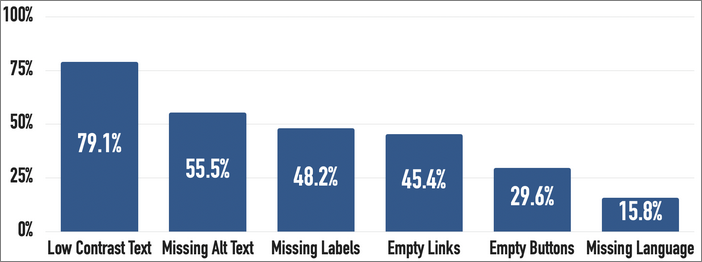
For the seventh year in a row, a missing document language made the list.
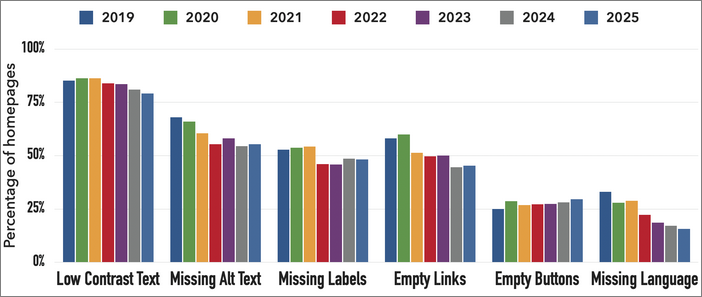
As with the rest of the items in the data, it has been a common theme the last seven years. Missing language attribute has always been the last item on the repeating list of common failures. So what are the implications?
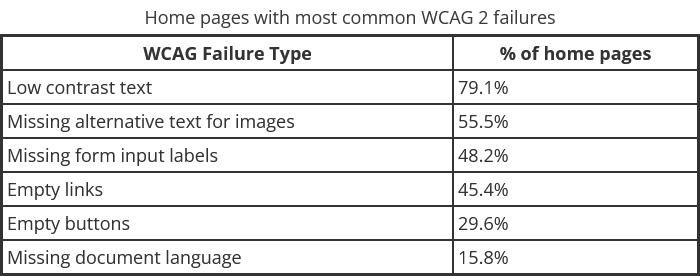
A numerical look shows the data is still trending to the same six problems in the report. So why is it that these issues are the ones that stay in the top six?
What Happens When the Language is Missing? The Wrong Voice Problem
The main group affected by a missing lang tag is the screen reader user. Screen readers are essential tools that read web content aloud. They're mainly used by people who are blind, have low vision or for those that use text-to-speech. They are also used by people that find reading difficult for other reasons, this is a common practice with people with ADHD (Adult attention-Deficit/Hyperactivity Disorder).
Screen readers don't just use one voice; they use specialized software packages for each language. This software knows the pronunciation rules, rhythm, and stress for English, French, Japanese, etc.
When your page is missing the lang attribute, the screen reader has to guess the language. It usually guesses based on the user's computer settings (for example, if the user lives in Germany, the screen reader will try to use the German voice).
Example: English Text Read by a German Voice
Imagine your entire website is in clear English. If a German screen reader tries to read it, it will apply German pronunciation rules.
“The” might sound like “Tee-hay.”
or;
“Data” might be pronounced with a hard ‘A’ sound instead of a soft one.
The result is garbled, unnatural, and often unintelligible speech. The text is still on the page, but for the screen reader user, the content is lost. They cannot understand your article, buy your product, or use your service.
This single small mistake transforms your helpful website into a frustrating, unusable experience.
It's a Rule, Not a Suggestion (WCAG)
Using the lang attribute isn't just a friendly suggestion; it's a core requirement for making your website accessible.
The Web Content Accessibility Guidelines (WCAG) are the international standard for web accessibility. WCAG Success Criterion 3.1.1 (Language of Page) states that the language of the page must be clear to the computer. This is a level ‘A’ requirement, which means it's mandatory for basic accessibility.
If your website fails this check, it is officially considered inaccessible.
How It Affects Other Tools
The lang attribute helps more than just screen readers:
1. Braille Displays
A refreshable braille display translates text into small patterns of raised bumps. Different languages use different contraction rules in braille (called Grade 2 braille). If the language is not set, the braille translator might use the wrong rules, turning clear text into meaningless gibberish for the braille reader.
2. Automated Translation
When a user relies on tools like Google Translate or a browser's built-in translation feature, telling the tool the source language (the language you wrote it in) ensures a much more accurate translation. If the source language is unclear, the translation quality drops sharply. An example can be found here.
3. Quotation Marks
The lang attribute helps the browser and other user agents select the correct typographical glyphs for quotation marks, especially when it comes to when the <q> and <blockquote> elements are used (when styled using CSS generated content such as content: open-quote). For example:
In English
lang="en", quotes are typically “double quotes”.In German
lang="de", they are often rendered as „low-9 quotes‟.In French
lang="fr", they use « guillemets ».
While less related to visual quotation marks, providing the correct language helps assistive technologies pronounce the surrounding text accurately, ensuring a fluid and comprehensible reading experience.
Not providing the correct language may cause browsers to default to the user's system language or a neutral setting for quotation marks which may not match the document's language which results in incorrect or confusing typography (e.g., using English quote marks for German language).
Without a declared language, a screen reader may attempt to read the text using incorrect phonetic rules, voice, and accent. Which makes the content sound like gibberish and can make it incomprehensible for users who rely on audio output.
4. Hyphenation
Proper hyphenation is entirely language-dependent. Hyphenation rules can be complex and unique to each language. when CSS is used, hyphens: auto, the browser or user agent relies on the lang attribute to load the appropriate hyphenation dictionary and apply correct linguistic rules which can improve text flow and readability. Especially in justified or narrow columns.
For example, a long compound word in German, lang="de", will be broken according to German rules such as Rechtsschutzversicherungsgesellschaften (which means, insurance companies providing legal protection).
Most browsers do not provide automatic hyphenation if the language is not declared. This can not only lead to unsightly text blocks with excessive white space between words, but also horizontal scrolling or overflow on mobile devices which severely impacts readability and layout stability.
If the browser attempts to guess the language or uses the wrong default, it could apply the incorrect hyphenation rules, which breaks words in places that are linguistically wrong, which, in turn, confuses the reader.
What About Pages with Two Languages?
What if your page is mostly English but includes a quote in Spanish? If you don't do anything, the screen reader will read the Spanish quote using the English voice, again leading to mispronunciation.
You can fix this instantly by adding the lang attribute to the specific element that changes language:
<p lang="en">
    The artist once said, "Always remember this phrase:
    <span lang="fr">Je ne regrette rien.</span>" I think that sums up his career.
</p>
In this code, the screen reader switches to the French voice for the quote and then immediately switches back to the English voice for the rest of the sentence. This small change ensures all users hear the content exactly as intended.
How to Set the Language in Modern Web Frameworks
In modern websites built with tools like React, Vue, or Angular, you usually don't touch the main HTML file very often. Since these tools mostly control the content inside the <body> tag, you have to know where to find the root template file to set the lang attribute correctly. for example,
React uses the file, public/index.html. Therefore you would directly place the attribute in the <html> tag in that file.
Here's a simple guide for the most popular frameworks:
| Framework | What File to Edit | Where to Put the Code |
|---|---|---|
| React | public/index.html | Directly on the <html> tag in that file. |
| Next.js | app/layout.tsx (or similar root file) | Set the lang in the JSX for the root <html> element. |
| Vue | public/index.html | Directly on the <html> tag in that file. |
| Nuxt | nuxt.config.ts | Inside the app.head.htmlAttrs setting in your config file. |
| Angular | src/index.html | Directly on the <html> tag in that file. |
| Svelte/SvelteKit | index.html or src/app.html | Directly on the <html> tag in the main template file. |
Example: Setting the Language in a Static Template
For most simple apps (React, Angular, plain HTML), you will open your main index.html file and change the first line like this:
<!DOCTYPE html>
<!-- Change the line below from <html> to the correct language code -->
<html lang="en">
<head>
    <!-- ... -->
</head>
<body>
    <!-- Your app code loads here -->
</body>
</html>
Conclusion
The lang attribute is a tiny line of code that provides universal access to your content. It's arguably the easiest, fastest, and most impactful accessibility fix you can make on any website.
By correctly setting the language, you ensure that everyone has equal access to your content. Regardless of whether they use a screen reader, braille display, or translation tool to do so, their tools have the fundamental information they need to do their jobs correctly. It's a simple commitment that makes the web better for everyone.
Don't let a missing two-letter code turn your content into a foreign language for your users and don't be afraid to use it or add it in!
About Todd Libby
Current desert nomad, lobster aficionado, long-time developer, founder of RouteReady, and W3C Invited Expert.
Site: unfiltered
Bluesky: @toddl.dev
Mastodon: @colabottles
GitHub: Todd @ GitHub
Comments
There are no comments yet.
Leave a comment